The client never approved it, and it went out anyway
Nobody decides to publish a post the client has not approved. It happens on a busy afternoon, through a door everyone forgot was open. This is where those doors are, and how to close them in SPREVA without slowing the team down.
Rodolfo MotaFounder of SPREVA
The short version
Turn on “Posts need approval before they go out” in Settings, General, and every post is sent for review first. Publishers and AI agents send posts for review instead of scheduling them, and nobody approves a post they sent. Owners and Admins can still schedule without review, on the record. A post nobody approved by its time is not sent, and changing an approved post sends it back for approval.
How an unapproved post goes live
Ask an agency how a post got published without approval and the answer is almost never “we decided to”. It is one of these:
- The time moved. The post was due on Friday, and the client answers on Thursdays. Someone moved it to Wednesday to fill a gap, and it went out unseen.
- The caption was fixed after the yes. A typo, a hashtag, a price corrected at the last minute: small changes that add up to a post the client never saw.
- Someone scheduled it in a hurry. A colleague covering a sick day found a finished draft, took it for approved, and scheduled it.
- A tool scheduled it. An integration or an AI agent did what it was asked, and nobody asked it to wait.
None of these is carelessness. Each is someone doing their job in a workspace that does not know which posts are approved. The fix is a social media approval workflow that every door goes through.
Turning approval on
In SPREVA it is one setting, “Posts need approval before they go out”, in Settings, General, for Owners and Admins. It applies to every way a post can leave: the composer, bulk scheduling, the API and AI agents.
Then invite whoever approves, usually the client, as a Reviewer: free, without a seat, seeing only the posts sent to them. Until there is one, Owners and Admins are asked. How the client approves from their phone.
Leave it off when nobody else needs to say yes: a team of one would only be asking itself, and nobody approves their own post. With it off, anyone who writes posts can still send one for review for a second pair of eyes.
What an Editor, a Publisher and an Owner each see
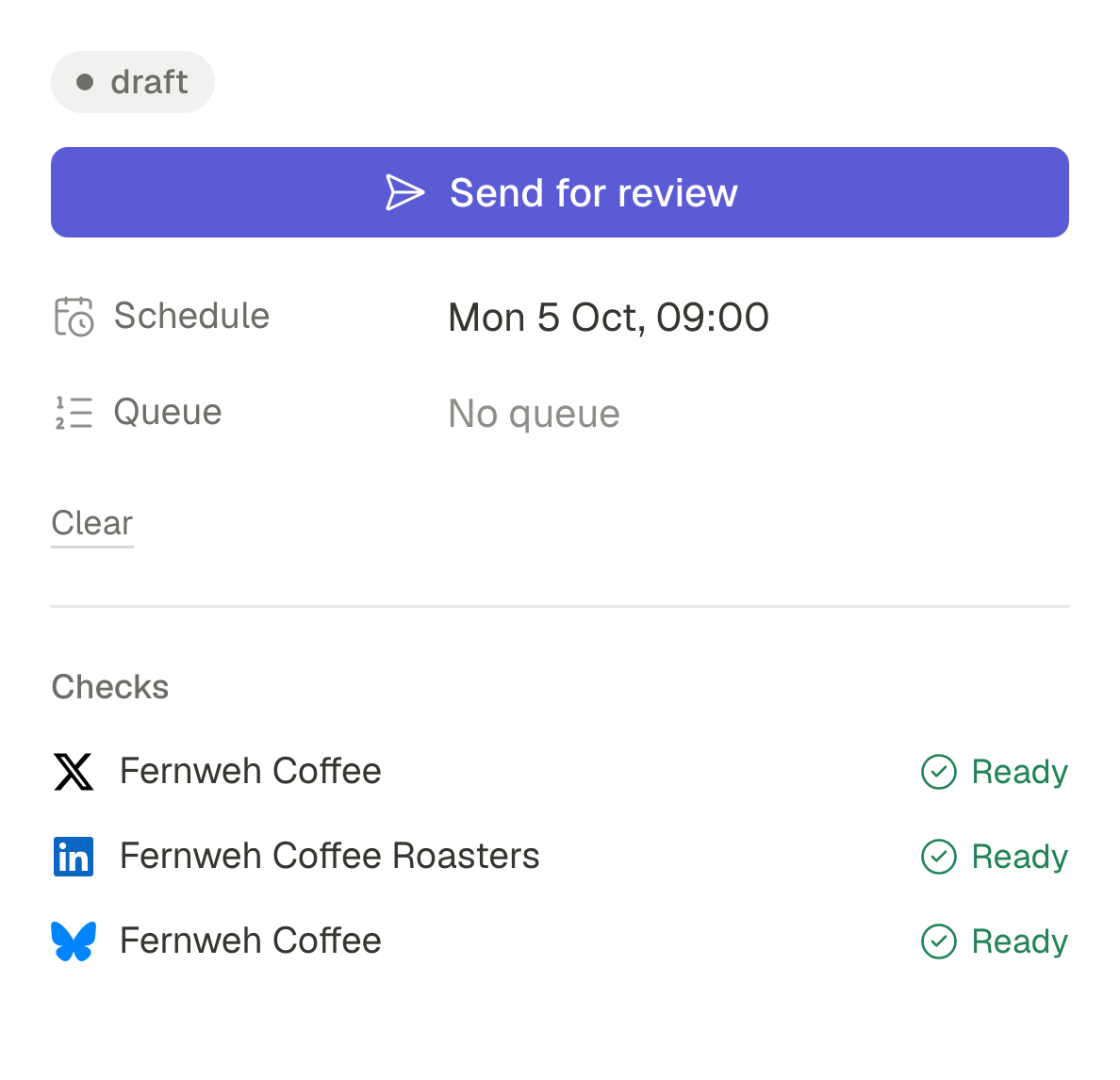
Once it is on, the composer's button depends on who is writing, and the time or the queue is chosen first, so approving asks nothing more:
- An Editor sees Send for review, as with approval off: they write the post, choose when it goes out, and send it.
- A Publisher sees Send for review where Schedule used to be. They cannot schedule a post without an approval, and cannot approve one.
- An Owner or Admin also sees Schedule without review, for the day the client cannot be reached and the post cannot wait. It is recorded as exactly that, never as an approval.
- An AI agent that schedules a post sends it for review instead, and says so. Agents and API keys can never approve: an approval is a person.
What happens at the deadline
A post in review is not scheduled; it waits. The reviewers get one email with everything waiting about a quarter of an hour after the last post was sent, then one reminder a day before the earliest time. With that reminder, the author is told nobody has answered yet, and can remind the reviewer from the post.
If the time comes and nobody has approved, the post is not sent. It becomes a draft again and its author is told, so it can take a new time and go for review again. Nothing goes out because a clock ran out.
Changing an approved post
An approval is of a version. Change the caption, a picture or the accounts of an approved post and it goes back to review, keeping its time. The composer warns before the first change, and Undo brings back the approved version and its approval.
Moving only the time does not ask the client again: a post that goes out an hour later is still the post the client approved. The move is recorded, and the client sees it on the post. What the record of an approval keeps.
Turn it on for one client
Turn on approval in one client's workspace, invite the client as a Reviewer and send them next week's posts. Approval works on every plan, reviewers are free up to 25 per workspace and take no seat, and every plan starts with a 7-day trial.
Questions
Can an Owner still publish without approval?
Yes, with Schedule without review. It is recorded with who did it and when, so it never passes for an approval.
Can the person who sent a post approve it?
No. Whoever sent a post for review cannot decide it, whatever their role. An Owner who needs their own post out schedules it without review, on the record.
What about posts an AI agent makes?
With approval required, a post the agent schedules is sent for review, and the agent says so. Asked to publish now, it is refused with the reason. How to set an agent's rules.
What happens to a post meant for a queue?
It waits without a deadline. Once approved, it takes the next free time of its queue, so a post nobody approved never holds a slot.
Written by
Rodolfo Mota
Founder of SPREVA
Makes SPREVA in Portugal: the Studio, the tools an agent works with, and the publishing behind them.
Keep reading
- “That is not what I approved”: what to show the clientA thumbs-up in a chat is weak proof when a client disputes a post. What an approval record should hold, how SPREVA keeps one, and how to use it calmly.
- How to get a client to approve posts from their phoneClients drop tools that want a password and a seat. How a client approves posts from a phone in SPREVA: one email, a sign-in link, each post as it will look.
- The client has not approved and the post is due: publish, hold or skip?The post goes out at nine and the client has not answered. Why holding beats publishing, how to set an approval deadline, and what to agree on first.