How to automate social media posting without sounding like a bot
Automation is easy to spot: the same sentence on five networks, a post about a sale that ended yesterday, a link dropped at 3am. None of that is the tool's fault. This is how to automate the parts that should be automatic, the times, the batch and the follow-through, and keep the part people read sounding like a person.

Rodolfo MotaFounder of SPREVA
The short version
Decide your posting times once, with a queue, and let each post take the next free one. Load a month in one sitting with bulk scheduling, up to 200 posts. Connect your own systems through the API and webhooks, or hand the routine to an AI agent with rules. Then keep what people read human: a text for each network, a person looking before anything goes out, and nothing repeating on a timer.
Four ways to automate, from simple to hands-off
Most teams need the first two; the last two are for when posts start somewhere else, or when you would rather ask than click.
| Way | Good for | How it works |
|---|---|---|
| A queue | A steady rhythm without choosing times | Weekly times in your time zone; each post takes the next free one |
| Bulk scheduling | A month of posts in one sitting | Up to 200 rows from files, the library or a CSV file |
| The API and webhooks | Posts that start in your shop, your site or a script | Create and schedule posts with an API key; webhooks say when each goes out |
| An AI agent | The routine, from a conversation | ChatGPT, Claude, Grok and others work through SPREVA, within your rules |
A queue: set the times once
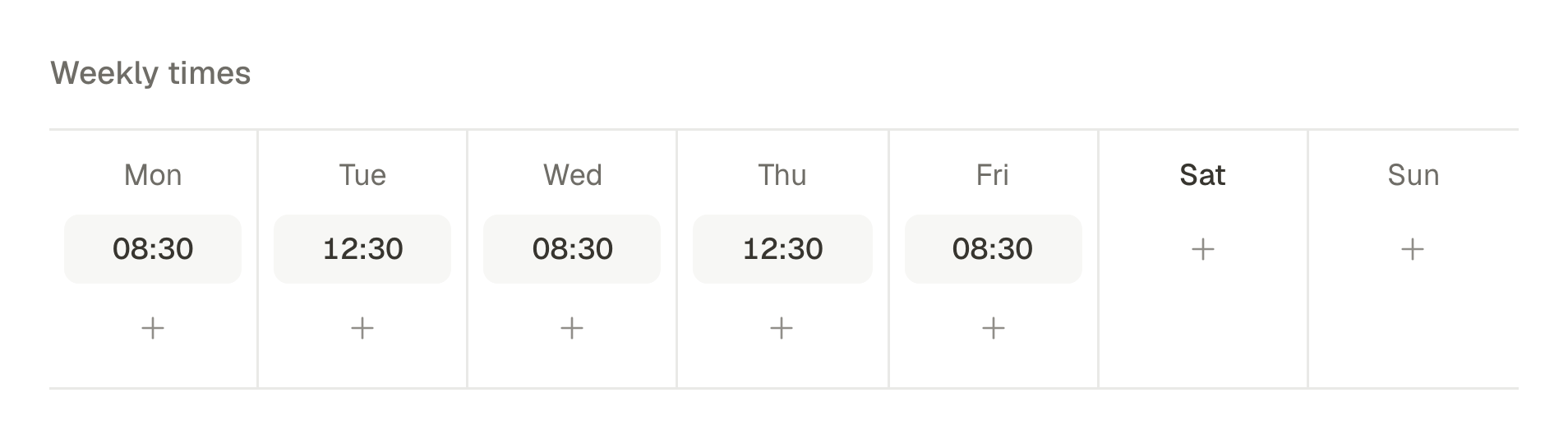
A queue is the simplest automation and the one most people need. Give it the times you want to post, say weekdays at 9am and 5pm, and its time zone. Add a post to the queue and it takes the next free time. Delete one and the others keep theirs, so nothing shifts under you; the free time goes to the next post you add. A queue belongs to the workspace, so one queue can serve several accounts.
Bulk scheduling: a month in one sitting
When posts are ready in advance (a launch, a month of tips, a product range), load them in one go: files from your computer, pictures from the library, rows of text, or a CSV file with a caption and, if you like, a file name, a title, a link and a time. Up to 200 rows at once.
Spread them out with one setting, every few hours or every few days at the same time, and choose for each row whether it stays a draft, goes out at its time or joins a queue. SPREVA checks every row against each network's rules as it schedules it. A row that fails does not hold up the others, and the failed ones can run again.
The API: when posts start somewhere else
When a post should follow something that happens elsewhere (a new product in your shop, an article on your site, a script that runs every morning), create and schedule it through the API with a key made under Developer, then API keys. Webhooks tell your system when each post is published or fails, signed so it can check they came from SPREVA. The API reference.
An AI agent: the routine, from a sentence
An AI agent connected to SPREVA turns the routine into a request:
Turn the five photos from Saturday's event into posts for the weekday queue, one per photo, each with its own caption for Instagram and for LinkedIn. Leave them as drafts so I can read them tonight.
What it may do on its own is your call, for each kind of action: Allow, Ask first or Needs approval. By default, drafts, edits and scheduling an hour or more ahead go through, while publishing right now, deleting a published post and spending AI credits ask first. How to set an agent's rules.
What keeps automated posts from sounding automated
The automation is in the timing and the plumbing. The words are where people notice:
- A text for each network. The same paragraph on LinkedIn and X reads as a copy. Under Per account, give each network its own words, or ask the assistant to adapt the text for one network within its limit.
- A person before the public. Turn on approval and every post, from bulk, the API or an agent, waits for a yes. Agents and API keys can never approve. How to make every post wait for a yes.
- Times that fit your audience. Each queue keeps its own time zone, so 9am is 9am where your customers are.
- Nothing on a loop. SPREVA does not recycle old posts on a timer: a post goes out once. To send one again, duplicate it and bring it up to date.
- Follow-through that does not need you. A post that fails because a network had a bad minute is tried again a minute later, then after five, fifteen and sixty minutes. If it still fails, you get a notification with the reason.
Automate one week first
Make one queue with the times you already post at, load next week's posts with bulk scheduling, and turn on approval if anyone else should see them first. Bulk scheduling, the API, webhooks and MCP are on every plan, and every plan starts with a 7-day trial.
Questions
Can SPREVA repeat evergreen posts automatically?
No. Each post goes out once, so nothing old resurfaces by accident. Duplicate a post to send it again, with its text brought up to date.
Can it post my new blog articles automatically?
Not from a feed yet. Through the API, your site can create a post when an article goes live, and a webhook confirms when it is out.
What happens if an automated post fails?
Only that account's post is retried, up to four more times over about an hour and twenty minutes, and the others go out as planned. If it still fails, you get a notification with the reason, and webhooks tell your system too.
Is the API on every plan?
Yes. Bulk scheduling, the API, webhooks and MCP for AI agents are on Starter, Pro and Business.
Written by
Rodolfo Mota
Founder of SPREVA
Makes SPREVA in Portugal: the Studio, the tools an agent works with, and the publishing behind them.
Keep reading
- How to let an AI agent manage your social media safelyLet Claude, ChatGPT or another AI agent draft, schedule and publish your social media without giving it your passwords: what it can see, what it must ask first, who can approve, and how to switch it off.
- A week of social media from one conversation with your AI agentMonday's photos become a video, Tuesday's post goes to every network in its own words, the queue fills itself and Friday brings the numbers. A week with an AI agent connected to SPREVA, prompt by prompt.
- The client never approved it, and it went out anywayA time moved, a caption fixed after the yes, a post scheduled in a hurry. How posts go out unapproved, and how SPREVA makes every post wait for a yes.