Why a video made by an AI agent should stay editable
Asking an agent for a video is easy now. Asking for the second scene to be shorter is where most tools hand you a new video instead. This is why SPREVA keeps what the agent makes as a project you can change, one step at a time.
Rodolfo MotaFounder of SPREVA
The short version
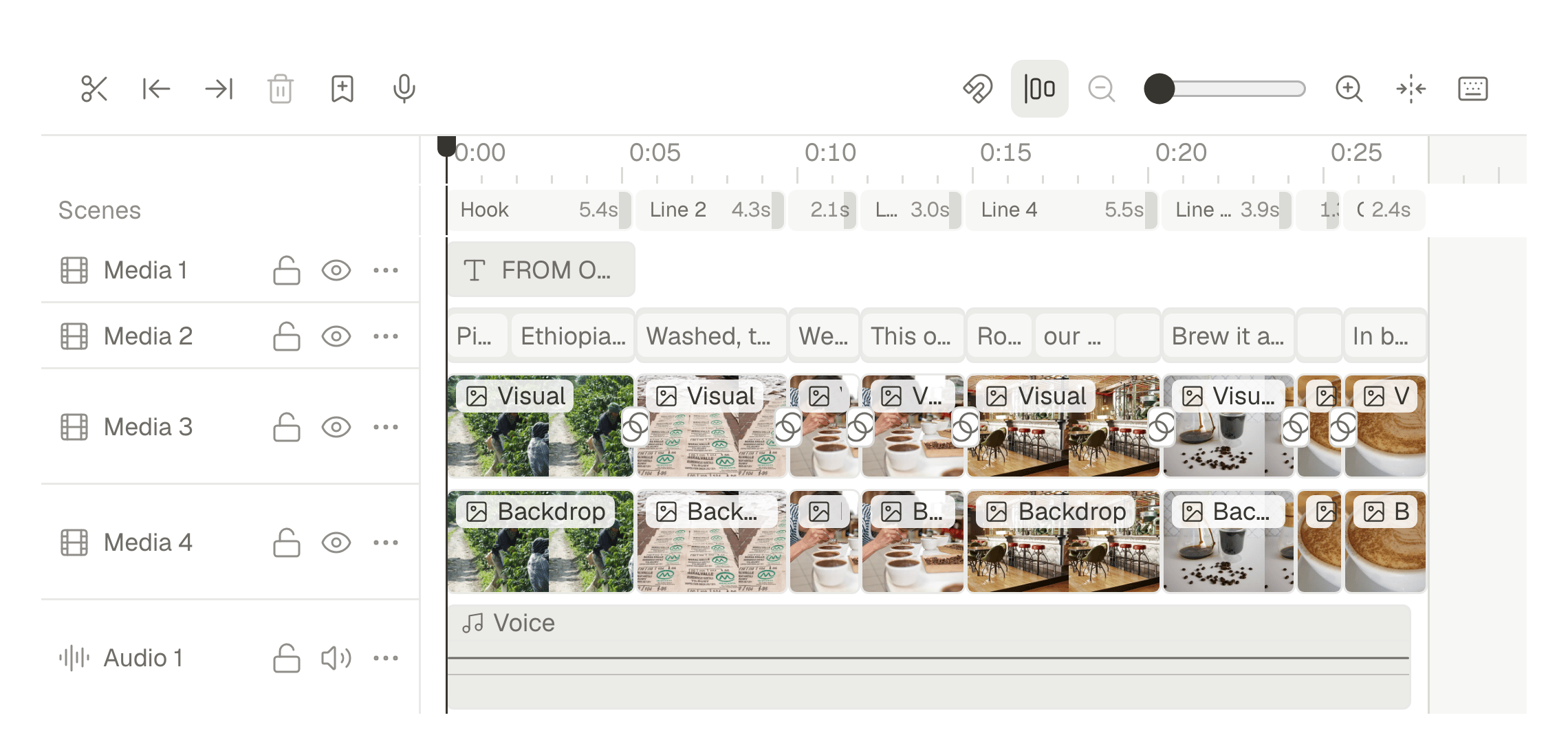
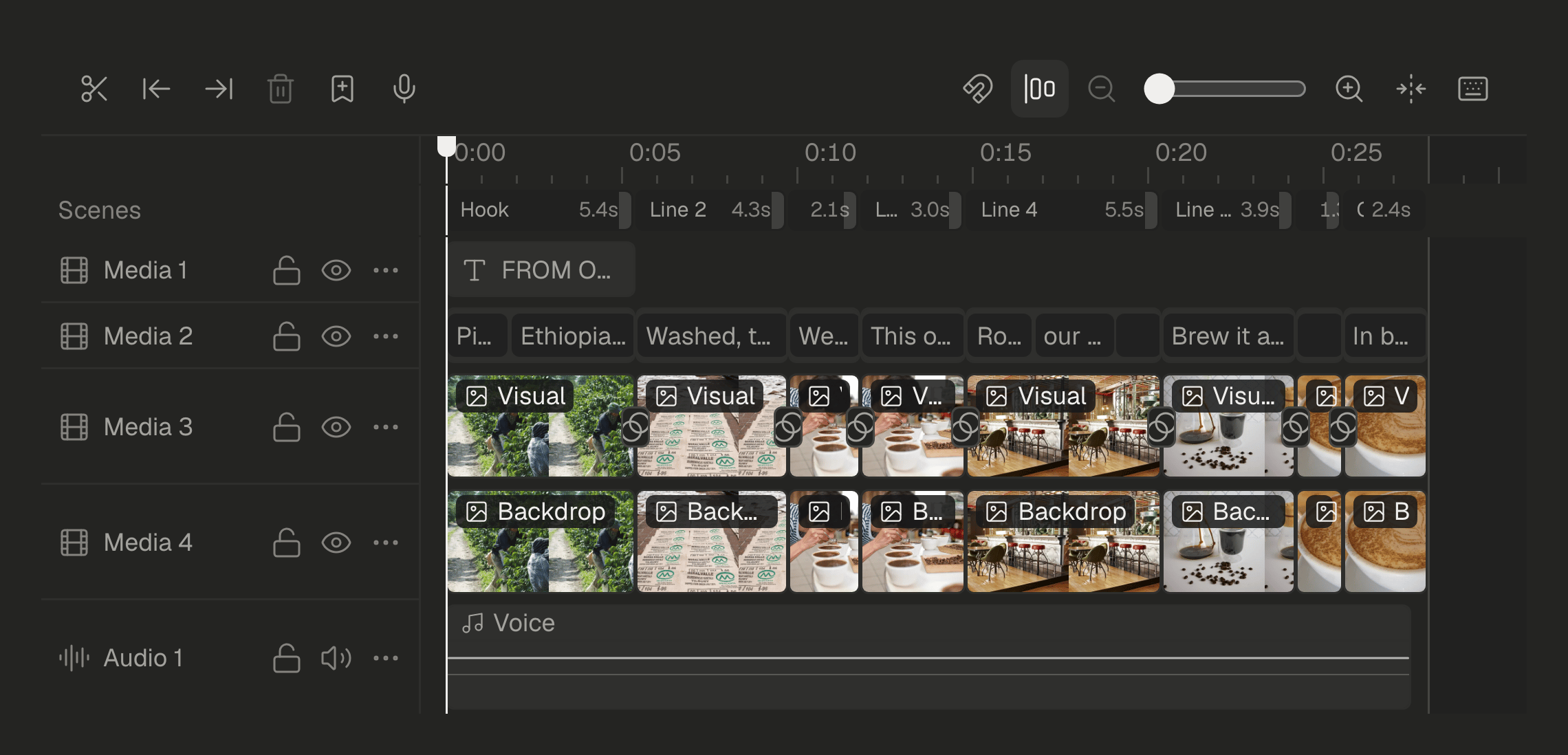
When an AI agent makes a video in SPREVA, it makes a Studio project: scenes on a timeline, a script, a voice track, pictures and captions, each of them separate. A change is a change to one of those parts, not a new video, so you can ask for “the second scene shorter” and get exactly that, with everything else where it was. Each change is one step you can undo.
The problem with a finished file
Most video generators end with a file. You describe what you want, wait, and get an MP4. If it is close but not right, you describe it again and wait again, and the new file is not the old one with a fix: the pacing has moved, the voice reads a little differently, the picture you liked in scene three is gone. You are not editing. You are rolling dice with a longer prompt.
For a one-off that can be fine. For social media it is not, because the work is never one video. It is the same video shortened for TikTok, reframed for a Story, with a different opening for LinkedIn, and then a new one next week that should look like this one. A file cannot carry any of that forward.
What editable means here
Editable does not mean a text box where you paste a new prompt. It means the thing the agent made has parts, and each part can be changed on its own:
- The script is text. Change a line and the narration can be recorded again, while the pictures and the captions keep their places.
- The pictures sit on the words they belong to. Swap a photo and the captions, the voice and the other scenes do not move.
- Every change is one step. Asked for by you or made by the agent, it goes into the same history, and undo takes it back.
- The timeline is yours too. Anything the agent can do you can do by hand: trim a scene, restyle the captions, add a logo, and the agent sees the result the next time you ask.
How the handoff works
In practice it is a conversation. With your agent connected to SPREVA, you ask for the video the way you would ask a colleague:
Make a 25 second vertical video from the five photos I uploaded this morning. Open on the empty shop, end on the first customer, warm voice, captions on every word.
The agent starts a project, writes the script, asks before the voice-over spends AI credits, places each photo on the line that describes it, checks the cut and exports it. Then you look at it, and you ask again:
Shorten the opening to two seconds and use the photo of the window instead of the door. Keep everything else.
Only the opening and one picture change. The voice, the captions and the other scenes stay exactly where they were, because the agent is editing the project, not making a new one. If you would rather drag the scene yourself, open the timeline: it is the same project, and the agent's next change lands on top of yours.
Why this matters more with an agent
When a person edits, they see what they are doing. When an agent edits, you see the result, and you need to trust that the result is what you asked for and nothing more. An agent that answers “shorter opening” with a new video has not done what you asked; it has done something that includes what you asked. The only way to tell the difference is to watch the whole thing again.
A project fixes this. The agent says what it changed, in scenes and seconds, and the history shows the same. You review the change, not the video. That is what makes it possible to hand over the repetitive work: the next ten versions for the next ten networks, the weekly video that should look like last week's, the caption in Spanish. Each is a change to something you already approved.
Try it on your own photos
Upload a handful of photos, ask your agent for a short vertical video, and then ask for one thing to be different. Watch what stays the same. Step by step, in the app or from ChatGPT or Claude, with Studio in the Pro and Business plans and a 7-day trial on both.
Questions
Does changing one scene make the whole video again?
No. The scene you named changes, and the rest of the project stays as it was. If the change touches the script, the narration can be recorded again and the pictures keep their places.
Can I edit by hand as well as by asking?
Yes. The agent's video is a Studio project like any other: open the timeline, move scenes, trim, restyle the captions or add your logo. The agent's next change lands on top of yours.
What if the agent changes something I did not ask for?
Every change, yours or the agent's, is one step in the same history. Undo it, or ask the agent to put it back.
Which agents can do this?
Any agent that speaks MCP, with setup pages for Claude, ChatGPT, Gemini, Claude Code, Codex and others. What each one can do in SPREVA.
作者
Rodolfo Mota
Founder of SPREVA
Makes SPREVA in Portugal: the Studio, the tools an agent works with, and the publishing behind them.
延伸閱讀
- A week of social media from one conversation with your AI agentMonday's photos become a video, Tuesday's post goes to every network in its own words, the queue fills itself and Friday brings the numbers. A week with an AI agent connected to SPREVA, prompt by prompt.
- 如何把照片做成有旁白和字幕的 Reel把幾張照片變成直式 Reel,加上 AI 旁白和逐字對齊的字幕,開口就能修改,再排程到 Instagram、TikTok 和 YouTube Shorts。在 App 中或從 ChatGPT、Claude 逐步完成。
- 給 AI 代理程式的社群媒體工具:你的代理程式需要什麼Claude 或 ChatGPT 這類 AI 代理程式要製作、排程和發布你的社群媒體內容,需要什麼:不必交出密碼的存取權、各平台的規則、媒體、影片、你的核准和成效數據。附上評估任何工具的檢查清單。